¶ Connect to WIFI
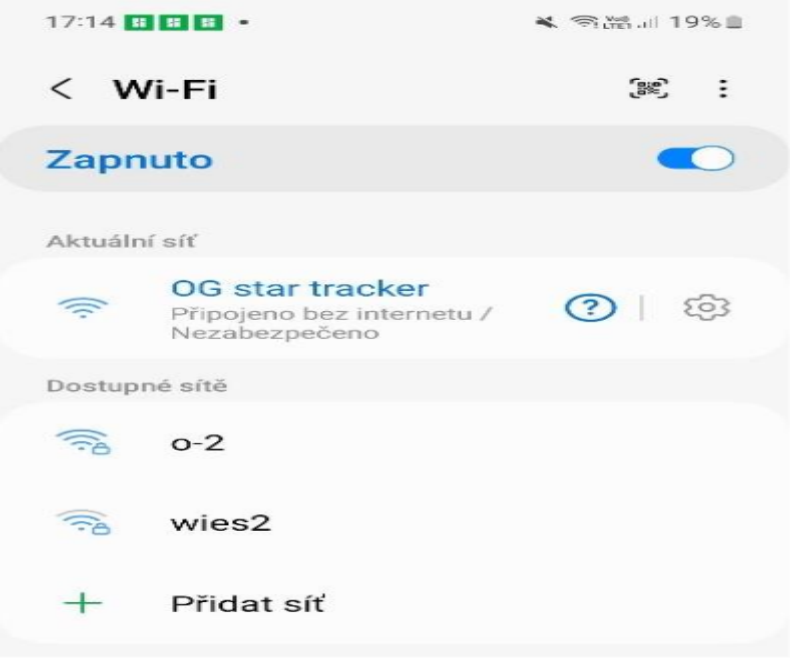
- After completing the setup and powering up the tracker, you can find the Wi-Fi signal corresponding to the device in the Wi-Fi list of your phone.
WIFI name: OGS Tracker_xxxxx

WIFI password:
Domestic:ogstadmin
Overseas or geek version: password123
- When connecting, the phone may pop up "There is no internet connection on this Wi-Fi" prompt, please selectstay connected.
- To ensure connection stability, it is recommended to temporarilyTurn off cellular data on your phone(mobile data).
¶ Enter the console
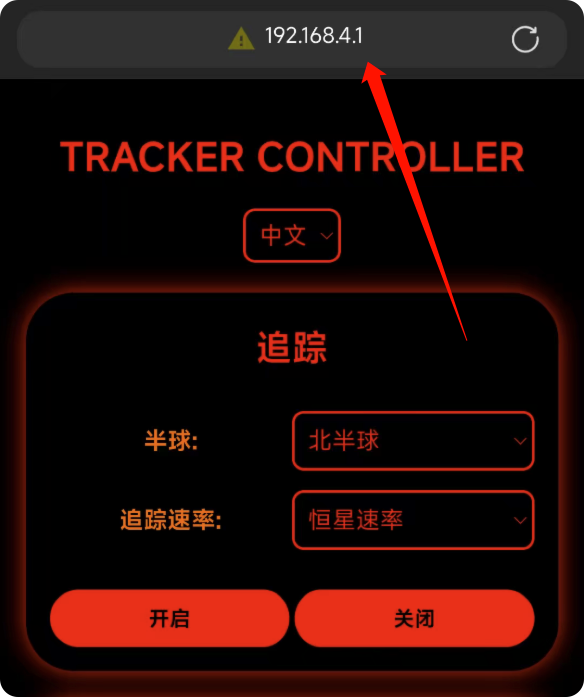
After connecting to the tracker's WIFI, open your phone's browser and enter the following address:
192.168.4.1 You can enter the control page of the equatorial mount, where you can set all configurations
You can also enter the following domain name to open the console:
tracker.com
or
tracker.local
Only after successfully connecting to the WIFI hotspot of the equatorial mount can you access the equatorial mount console through the domain name.
Brief introduction:
- Language selection button:This button allows you to change the language of the tracker interface
- Hemisphere selection:Selecting a different hemisphere changes the tracking direction. When you select the wrong hemisphere, the stars will become blurry.
- Tracking rate:Select stellar speed when shooting starry sky, and select solar speed and lunar speed when shooting the sun and moon.
After the configuration is completed, you need to click the Enable button! At this time, the tracking indicator light is always on, indicating that tracking is in progress.
Please be assured: closing the page or disconnecting WiFi will not affect the work of the equatorial mount
The control page will be constantly updated, what you see may be slightly different, but the logic used is consistent