¶ Tracking mode and axial movement control instructions
This device supports multiple tracking speeds (Tracking Rate) and manual axial movement functions, and the appropriate mode can be selected according to different shooting targets. Selecting the mode correctly will help you obtain clear and stable starry sky images.
¶ 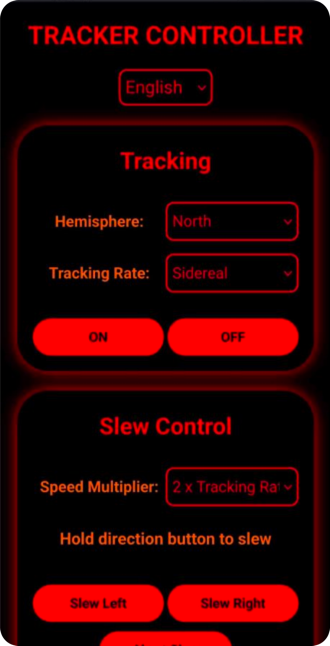
¶ 1. Tracking mode (Tracking)
In this menu, you can select the corresponding tracking speed according to different shooting objects.
¶ # 1. Sidereal mode
Most commonly used mode (about 99% of usage time)
This mode is used for shooting stars and deep sky objects in the night sky, and is the standard mode for daily starry sky photography.
Applicable scenarios:
- Starry sky photography
- Galaxy Photography
- Nebula and star cluster photography
- Deep space photography
- Wide angle star-field astrophotography
Description:
This mode compensates for the apparent motion of the stars (sidereal rate), keeping stars stationary during long exposures and preventing trails.
If you're not sure which mode to choose:
selects Sidereal mode by default.
¶ # 2. Lunar mode
This mode is used for photographing the moon.
Applicable scenarios:
- Moon photography
- Detailed shots of the lunar surface
- Shoot the moon continuously for a long time
Description:
Compared to stellar mode:
The speed difference in moon mode is very small
However, due to the additional motion of the moon relative to the stars, using Moon mode can result in more accurate tracking during longer exposures or continuous shooting.
¶ # 3. Solar mode
This mode is used for photographing the sun.
Applicable scenarios:
- Sun Photography
- Solar eclipse observation
- Solar activity records
Description:
This mode compensates according to the apparent motion speed of the sun ** **.
Especially useful in the following scenarios:
- Partial eclipse
- Total solar eclipse
- Long time sun shooting
Important Note:
When doing sun photography, you must use professional sun filters, otherwise you may damage your equipment or cause serious damage to your eyes.
¶ 2. Hemisphere Button
The Hemisphere button is used to change the tracking direction of the device to accommodate different geographical hemispheres.
¶ # Function description
This button is used for:
- Switch tracking direction between Northern and Southern Hemispheres
- Fixed the problem of wrong tracking direction
¶ # Typical usage scenarios
¶ # 1. Change usage location (across hemispheres)
For example:
- Moving from the Northern Hemisphere to the Southern Hemisphere
- Or use the device in the Southern Hemisphere
Need to switch hemisphere direction.
¶ # 2. Troubleshoot tracking direction errors
If this occurs:
- Stars trail rapidly
- Star points are seriously blurred
- The tracking direction is obviously wrong
One of the possible reasons is:
Hemisphere direction setting error
At this time, you can switch the hemisphere button to make corrections.
¶ 3. Axial movement control (Slew Control)
This function is used to manually drive the tracker spindle to rotate to make the device move in one direction or the opposite direction.
(Note: This is not "slide rail", but spindle rotation control)
¶ # Function
Using this feature you can:
- Manually move the tracker spindle
- Adjust camera pointing direction
- Fine-tune screen composition
This feature is particularly suitable for:
- Finely adjust shooting composition
- Move the target to the center of the screen
- Check polar alignment when camera blocks polar view
¶ # Typical application scenarios
¶ # 1. Fine-tune the picture composition
When the target has entered the field of view but the position is not ideal:
Slew Control can be used:
Slow moving spindle
Until the composition is satisfactory.
¶ # 2. Check polar alignment (when camera is blocked)
When the camera installation position blocks polar scope or the observation path:
By moving the spindle:
Observe the movement of stars,
Auxiliary judgment:
Is the polar axis aligned correctly?
¶ 4. Movement speed multiplier (Speed Multiplier)
This function is used to adjust the speed when the moves axially (Slew).
¶ # Function description
Speed Multiplier:
What has changed is:
Rotation speed when manually moving the spindle
instead of:
Track the speed itself.
This is very important.
¶ # Usage suggestions
¶ # Low speed magnification
Applies to:
- Fine composition adjustment
- Telephoto lens
- Pinpoint the target
Features:
- Move smoothly
- Fine control
¶ # High speed magnification
Applies to:
- Quickly move the field of view
- Initial search target
- Large range of direction adjustment
Features:
- Move quickly
- Improve adjustment efficiency
¶ 5. Clarification of key concepts (important)
To avoid misunderstandings, the following terms are specifically explained:
-
Tracking
Refers to the function of the device to automatically compensate for the movement of celestial bodies -
Slew (axial movement)
Refers to manually driving the spindle to rotate and used to adjust the direction. -
Speed Multiplier (speed multiplier)
It only affects manual movement speed and does not affect tracking accuracy.
¶ 6. Quick usage suggestions
In daily use, it is recommended to follow:
- Starry sky photography uses sidereal mode by default
- For lunar photography, use Lunar mode (Lunar)
- Sun photography uses solar mode (Solar)
- If stars move in the wrong direction, check the hemisphere setting.
- Use axial movement (Slew) when adjusting the composition
- Use low speed magnification for fine adjustment