¶ Dither function (Dither) description
Dither automatically makes small random tracker movements between exposures, reducing fixed-pattern noise and improving the quality of the final stacked image.
This is especially important in deep-sky imaging because it significantly reduces walking noise.
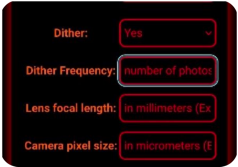
¶ 1. Dither function
After enabling the Dither function:
Between each or every few exposures, the tracker:
moves a small distance in a random direction
This small displacement allows:
- Fixed pattern noise position changes
- Easier to be eliminated evenly when superimposed at a later stage
Final effect:
- Reduce noise streaks
- Improve background uniformity
- Improve overall image quality
¶ What is Walking Noise?
Walking noise is a common problem in deep space photography and manifests as:
- Oblique or linear noise patterns appear in the image
- Still obvious after superimposing multiple pictures
- The noise appears like "drag" or "walk"
Main reasons:
The fixed noise position is the same for each photo, while the target position gradually drifts slightly.
After enabling Dither:
This fixed noise structure can be effectively broken up.
¶ 2. Dither Frequency
Dither Frequency (dither frequency) is used to set:
Perform dithering every how many photos
¶ # How to work
For example:
If set:
Dither Frequency = 3
means:
Perform a random move after every 3 photos taken
instead of:
Each one moves.
¶ # Meaning of use
This feature is available for:
Don’t want every photo to be shaken.
For example:
- Reduce waiting time
- Improve shooting efficiency
- Avoid frequent movement affecting the shooting rhythm
¶ # Recommended settings
Common suggestions:
- Short exposure (≤60 seconds): jitter every 2–3 frames
- Long exposure (≥120 seconds): jitter every 1–2 shots
¶ 3. Lens focal length and pixel size settings
In order to achieve the best dithering effect, the following two key parameters need to be entered:
¶ # 1. Lens Focal Length
Input:
The focal length of the currently used lens (unit: mm)
For example:
- 50mm
- 135mm
- 300mm
This parameter is used for:
Calculate the image scale (field of view size).
¶ # 2. Camera Pixel Size
Input:
Camera single pixel size (unit: micron μm)
For example:
- 3.76 μm
- 4.3 μm
- 5.9 μm
This parameter is usually available in:
Check the camera specifications manual.
¶ # Automatically calculate jitter amplitude
When typing:
- Lens focal length
- Pixel size
Afterwards, the system will:
Automatically calculates the optimal jitter amplitude suitable for the current device
This ensures:
- The jitter distance is effective enough
- At the same time, it will not affect the composition too much
¶ 4. Usage suggestions
For best results, it is recommended to enable Dither in the following scenarios:
Recommended:
- Deep space photography
- nebula imaging
- Star cluster photography
- Multiple long exposure overlays
Not recommended:
- Single exposure shooting
- Wide-angle starry sky photography
- Short time-lapse photography
¶ 5. Key usage tips
When using the Dither function, please note:
- Recommended to be used with multiple image overlay processing
- Enter the correct focal length and pixel size
- Set the dither frequency appropriately according to the exposure time
- Telephoto systems recommend performing dithering more frequently
Proper use of the Dither function can significantly improve the quality of deep space photography images and reduce the difficulty of post-processing.